Crop a video
A landscape video made vertical or square, the part you choose kept.
Drop files here
or click to choose from your deviceAccepted: MP4, M4V, MOV
Up to 3 files per runUp to 150 MB per file5 runs per dayRemove limits with Pro✓ Works offline
Your files stay on your device
This tool runs entirely in your browser. Nothing is uploaded, nothing is stored, and you can even turn off your internet connection before you start.
Example
A sideways beach clip made vertical for Reels, keeping the person on the right
Sam filmed 20 seconds at the beach with the phone held sideways: beach.mp4, Full HD 1920 × 1080. The red and white parasol and the sea fill the left; Sam’s sister Maya stands on the right, smiling at the camera. For a vertical post: Shape “Vertical 9:16 (Shorts, Reels, TikTok)”, Keep “The right (or bottom)”, Flip “No”.
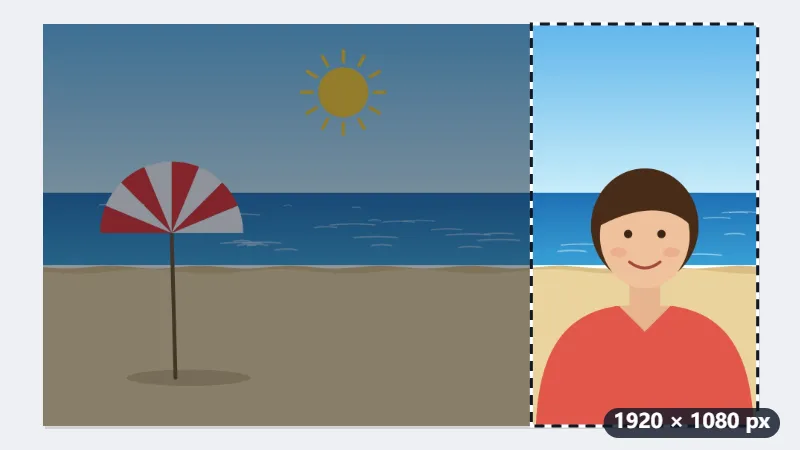
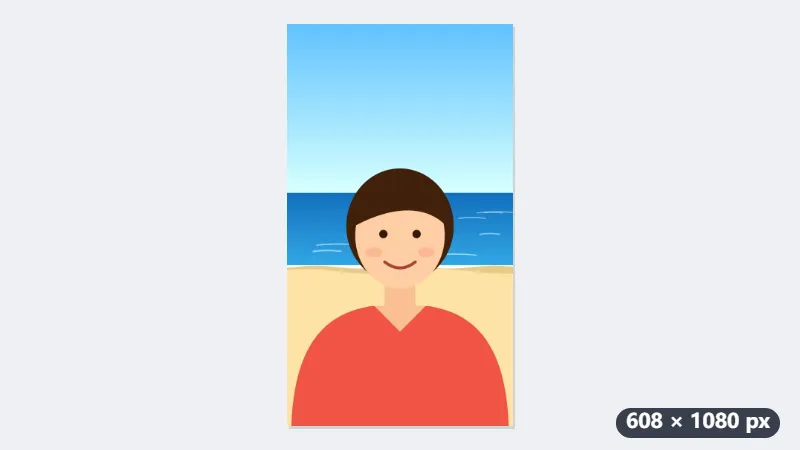
- 9:16 keeps the full height of 1080 pixels; the width becomes 1080 × 9 ÷ 16 = 607.5, rounded to 608.
- “The right” keeps pixels 1312 to 1920 across, where Maya stands. “The middle” would keep 656 to 1264, the sea between the parasol and her.
- Select Crop video. Every frame is drawn again and encoded as H.264, and the phone’s AAC sound is copied as it is.
| Shape | Kept with “The right” | Result |
|---|---|---|
| Vertical 9:16 | pixels 1312–1920 | 608 × 1080 |
| Portrait 4:5 | pixels 1056–1920 | 864 × 1080 |
| Square 1:1 | pixels 840–1920 | 1080 × 1080 |
| Widescreen 16:9 | the whole picture | 1920 × 1080 |
beach-cropped.mp4: 608 × 1080, the same length and sound, Maya in the frame. The tool never enlarges a video, so it stays 608 × 1080 rather than becoming 1080 × 1920; players scale it to the screen. A 4K clip (3840 × 2160) cropped the same way comes out at 1080 × 1920.
How it works
- Drop an MP4 or MOV onto the box.
- Choose the new shape: 9:16 for Shorts, Reels and TikTok, 1:1 for a square post, 4:5 for an Instagram portrait.
- Choose which part of the picture to keep — the middle, or the left or right side of a landscape video — and whether to mirror it.
- Select Crop video and download the MP4.
Frequently asked questions
- How long does it take?
- The picture is decoded and encoded again as H.264 at a high bit rate (up to 1920 pixels on the long side), which takes about as long as the video lasts on a typical computer and needs Chrome, Edge or Safari 16.4 or newer. The sound is copied as it is. That holds for AAC sound, which phones record; another kind (PCM in a camera MOV) is left out, and the result says so.
- Can I choose exactly where to crop?
- You choose the middle or either side, which covers most cases: a speaker on one side of a landscape shot, or the middle of a group. A crop at an exact position is not offered yet.
- What happens to a video filmed on a phone held upright?
- The crop is made to the video as it plays. A phone stores an upright clip on its side with a note to turn it; the turn is applied first, so what you see is what is cropped, and the result plays the right way up everywhere.
- Can I crop several videos at once?
- Yes. Drop up to 3 videos in one run on the free plan; each is cropped with the same shape, side and flip and comes back as its own MP4 named after the original with -cropped added.
- Why is the result not 1080 × 1920?
- The crop keeps the pixels that were there and never enlarges them. A Full HD clip (1920 × 1080) has 1080 pixels of height, so 9:16 gives 608 × 1080. A 4K clip has more to spare: 3840 × 2160 cropped to 9:16 is written at 1080 × 1920, the most this tool writes on the long side being 1920.
- Is the video uploaded, and what are the free limits?
- Nothing is uploaded. The free plan allows 3 videos of up to 150 MB per run and 5 runs a day. Pro removes these limits.