Flip a video
A mirrored selfie clip turned the right way round.
Drop files here
or click to choose from your deviceAccepted: MP4, M4V, MOV
Up to 3 files per runUp to 150 MB per file5 runs per dayRemove limits with Pro✓ Works offline
Your files stay on your device
This tool runs entirely in your browser. Nothing is uploaded, nothing is stored, and you can even turn off your internet connection before you start.
Example
Example: a selfie clip with a “Thank you, Miss Khan!” card that reads backwards
Parents are collecting clips for a teacher’s leaving video. One, filmed on the front camera, shows a mum holding a card that says “Thank you, Miss Khan!”, and in the saved video the words are back to front. thanks.mp4: portrait, 1080 × 1920, 20 seconds with sound. Settings as the page opens: Keep the shape, Mirror left to right.
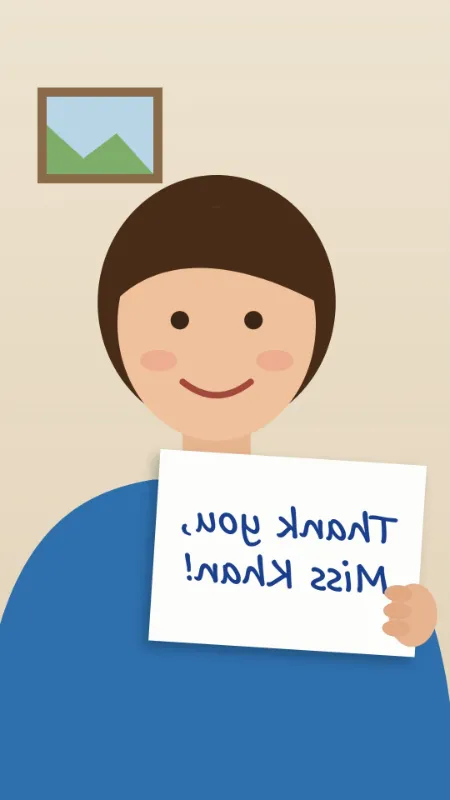

- Every frame is mirrored left to right: the card reads normally again, and the hand holding it moves to the other side, as other people see her.
- The picture is encoded again as H.264 at 1080 × 1920 and 30 frames a second, at about 10 Mbit/s: roughly 25 MB for 20 seconds, plus the sound, which is copied unchanged.
- A portrait clip stays portrait: the turn the phone records in the file is drawn into the picture.
- A 4K clip (2160 × 3840) comes out at 1080 × 1920, since the long side is capped at 1920; a 60 fps clip keeps 60 fps, at about 20 Mbit/s.
| Clip | Settings | Comes out as |
|---|---|---|
| Portrait 1080 × 1920, 30 fps | Keep the shape, Mirror left to right | thanks-flipped.mp4, 1080 × 1920, about 10 Mbit/s |
| Portrait 4K, 2160 × 3840 | Keep the shape, Mirror left to right | …-flipped.mp4, 1080 × 1920 |
| Portrait 1080 × 1920, 60 fps | Keep the shape, Mirror left to right | …-flipped.mp4, 60 fps, about 20 Mbit/s |
| Landscape 1920 × 1080 | Vertical 9:16, The middle, Mirror left to right | …-cropped.mp4, 608 × 1080 |
thanks-flipped.mp4: still portrait, the card readable, the sound as it was. On a typical computer it takes about as long as the clip lasts, 20 seconds here, and the free plan takes 3 clips in one run.
How it works
- Drop an MP4 or MOV onto the box.
- Keep "Mirror left to right" to undo a front-camera mirror, or choose upside down.
- Select Flip video and download the MP4.
Frequently asked questions
- Why is my video mirrored?
- Front cameras show you as in a mirror, and some apps save the clip that way, so text and logos read backwards. Mirroring it again puts them the right way round.
- Is flipping the same as rotating?
- No. Rotating turns the picture a quarter or half turn; flipping mirrors it. For a video on its side, use Rotate video, which is instant and needs no re-encoding.
- How long does it take?
- The picture is decoded and encoded again as H.264 at a high bit rate (up to 1920 pixels on the long side), which takes about as long as the video lasts on a typical computer and needs Chrome, Edge or Safari 16.4 or newer. The sound is copied as it is. That holds for AAC sound, which phones record; another kind (PCM in a camera MOV) is left out, and the result says so.
- Mirror or upside down: which one do I need?
- Mirror left to right when writing reads backwards. Upside down flips the picture top to bottom, like a reflection in water, and leaves writing mirrored too. A clip that is simply the wrong way up was turned rather than flipped: Rotate video at 180° puts it right without re-encoding.
- Will the flipped video be bigger than the original?
- It can be. The picture is encoded fresh at about 10 Mbit/s for 1080 × 1920 at 30 fps, roughly 75 MB a minute, whatever the original’s bit rate, so a clip the phone saved at a lower rate grows. Put it through Compress video afterwards if it has to be small.
- Is the video uploaded, and what are the free limits?
- Nothing is uploaded. The free plan allows 3 videos of up to 150 MB per run and 5 runs a day. Pro removes these limits.